 嵌入式开发
嵌入式开发 MicroPython vs Arduino vs PlatformIO: A Comprehensive Comparison of Embedded Development Frameworks
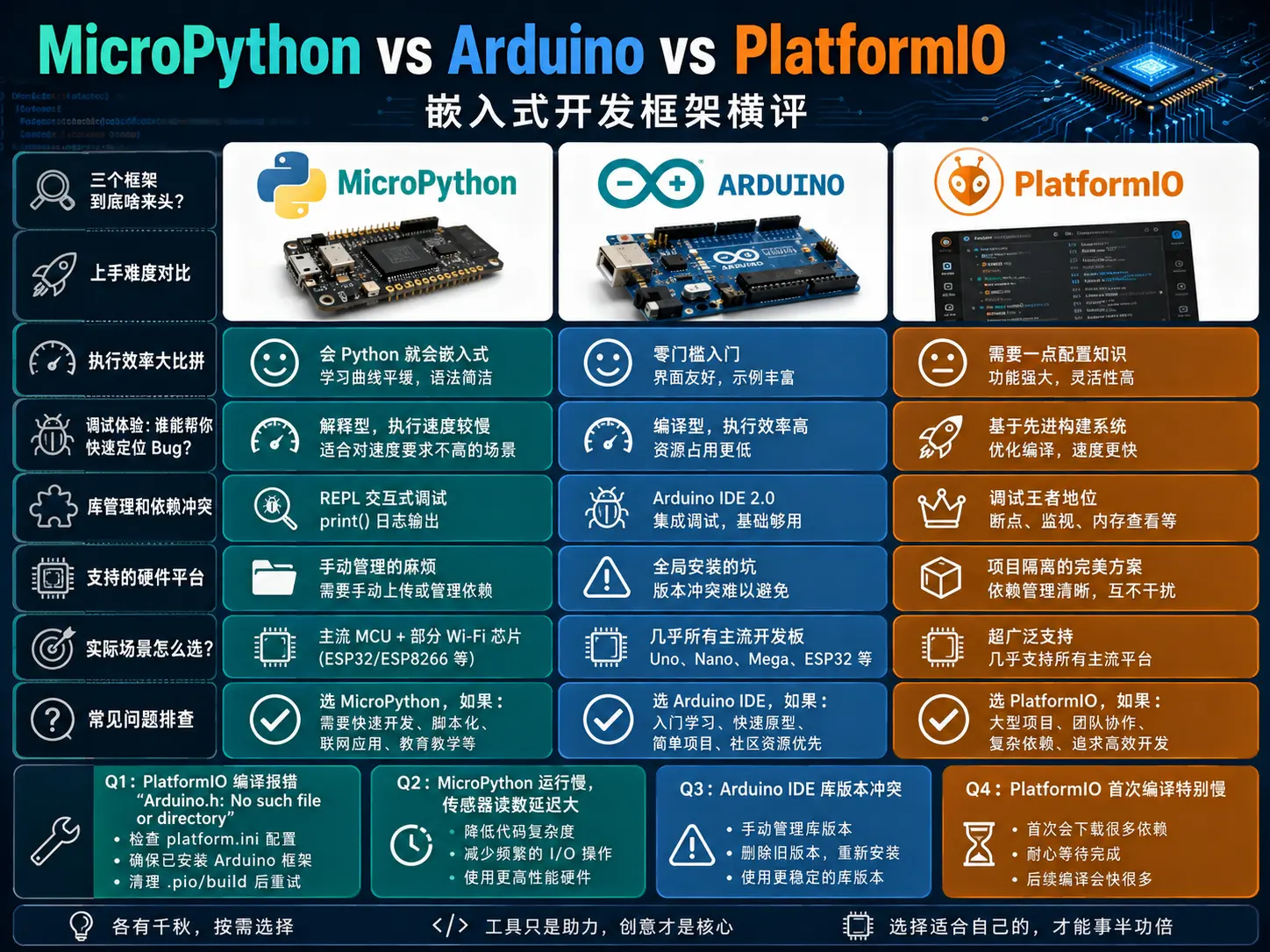
Choosing the right development framework can make your embedded project significantly easier. Today, let’s put MicroPython, Arduino IDE, and PlatformIO head-to-head and see which one is the best fit for your next project.
Who Are These Three Contenders?
Let’s start with a quick introduction to each:
Arduino IDE is the “mentor for beginners” in embedded development. Born in 2005 and designed specifically for Arduino boards, it features a clean interface and a fast learning curve. The latest Arduino IDE 2.0, rebuilt on the Eclipse Theia framework, adds advanced features like code completion and a debugger, but the core philosophy remains the same — getting even newcomers to blink an LED quickly.
MicroPython brings the Python language to microcontrollers. Created by Damien George in 2013, it includes a Python-to-bytecode compiler and a runtime interpreter. You can run Python code directly on boards like the Raspberry Pi Pico and ESP32 — no compilation needed, just edit and run.
PlatformIO takes a different approach. It’s not a standalone IDE but rather a plugin ecosystem for editors like VSCode and Atom. Supporting 900+ development boards and 30+ microcontroller platforms, it uses platformio.ini configuration files to manage project dependencies and build settings — more like a professional-grade firmware development toolchain.
Ease of Getting Started
Arduino IDE: Zero Barrier to Entry
Arduino IDE’s biggest advantage is its simplicity. Install the software, plug in your board, select the right port, hit the upload button, and your code runs. No need to understand Makefiles, linker scripts, or even what a compiler is.
void setup() {
  pinMode(LED_BUILTIN, OUTPUT);
}

void loop() {
  digitalWrite(LED_BUILTIN, HIGH);
  delay(1000);
  digitalWrite(LED_BUILTIN, LOW);
  delay(1000);
}
The blink code above is Arduino’s classic beginner example. setup() runs once, loop() runs forever — the logic is as clear as pseudocode.
MicroPython: If You Know Python, You Know Embedded
If you already know Python, MicroPython has virtually no learning curve. The same blink functionality:
from machine import Pin
import time

led = Pin("LED", Pin.OUT)

while True:
    led.low()
    time.sleep(1)
    led.high()
    time.sleep(1)
The syntax is nearly identical — just digitalWrite becomes led.low()/high(). MicroPython code is interpreted, so changes take effect immediately after saving without reflashing firmware, making debugging very convenient.
PlatformIO: Requires Some Configuration Knowledge
PlatformIO has a slightly steeper learning curve. You need to install VSCode first, then the PlatformIO plugin, and select your target board and framework when creating a project. The project structure is also more complex than Arduino’s:
my_project/
├── platformio.ini    # Project configuration
├── src/
│   └── main.cpp      # Main program
├── include/          # Header files
├── lib/              # Local libraries
└── test/             # Test code
platformio.ini is the heart of your project:
platform = espressif32
board = esp32dev
framework = arduino
lib_deps =
    adafruit/Adafruit BME280 Library @ ^2.2.2
    bblanchon/ArduinoJson @ ^6.19.4
The beauty of this declarative configuration is that the project can be copied entirely to another machine, and as long as PlatformIO is installed, it compiles with one click — no more “it works on my machine” problems.
Ease of Getting Started Ranking: Arduino IDE < MicroPython < PlatformIO
Execution Efficiency Showdown
Compiled vs Interpreted
This is the most fundamental difference between Arduino/PlatformIO and MicroPython.
Arduino IDE and PlatformIO both compile C/C++ code into machine code that runs directly on the MCU. MicroPython, on the other hand, first compiles Python code into bytecode, which is then executed line-by-line by the runtime interpreter.
How big is the speed gap? According to an MDPI study, for the same neural network inference task, Arduino C was nearly two orders of magnitude faster than MicroPython. For simple sensor reads and GPIO control, this gap is barely noticeable; but once you get into audio processing, FFT, or real-time data streams, MicroPython can become a bottleneck.
PlatformIO’s Build Advantages
Even when both are compiling C/C++, PlatformIO has significant advantages over Arduino IDE:
-
Incremental compilation: Only recompiles modified files, making large project builds 3-4x faster
-
Parallel compilation: Automatically leverages multi-core CPUs
-
Flexible build flag configuration: Add a single line
build_flags = -O2inplatformio.inito enable optimizations
I benchmarked a 5,000-line IoT firmware project: PlatformIO’s full compile took about 15 seconds, while Arduino IDE took nearly 1 minute. If you’re compiling dozens of times a day, that time difference really adds up.
Execution Efficiency Ranking: PlatformIO ≈ Arduino IDE >> MicroPython
Debugging Experience: Who Helps You Find Bugs Fast?
Arduino IDE 2.0’s Debugging Capabilities
Arduino IDE 2.0 finally added hardware debugging support, but with significant limitations:
-
Only supports SAMD series (MKR, Zero, Nano 33 IoT/BLE) and Portenta boards
-
Requires an external J-Link or Atmel-ICE debugger
-
Supports breakpoints, variable inspection, and call stack viewing
If you’re using ESP32 or STM32, Arduino IDE is basically useless for debugging — you’re stuck with Serial.println() logging.
PlatformIO’s Debugging Supremacy
PlatformIO supports a wide range of debuggers and MCUs through OpenOCD:
-
Full coverage of mainstream platforms: ESP32, STM32, nRF52, SAMD, etc.
-
Supports JTAG and SWD protocols
-
ST-Link, J-Link, Black Magic Probe debuggers work plug-and-play
-
Conditional breakpoints, memory inspection, register monitoring — the full toolkit
Here’s a real example: while debugging I2C communication on a custom STM32 board, I used PlatformIO + ST-Link to set a conditional breakpoint — automatically pausing when a specific register value went out of range. This is simply impossible in Arduino IDE, where you’d have to keep adding logs, reflashing, and retesting — wasting a lot of time.
MicroPython’s Debugging Approach
MicroPython doesn’t support traditional hardware debuggers, but it has its own strengths:
-
REPL interactive terminal: Connect via serial and directly type Python commands, query variables, and call functions in real time
-
Hot reload: Code changes take effect immediately after saving, no reflashing needed
-
Clear exception stacks: Python-style tracebacks tell you exactly which line failed
For rapid prototyping, MicroPython’s REPL is incredibly efficient. But when dealing with low-level hardware issues (timing, interrupt conflicts), you still need an oscilloscope and logic analyzer.
Debugging Capability Ranking: PlatformIO > Arduino IDE 2.0 > MicroPython
Library Management and Dependency Conflicts
Arduino IDE: The Pitfalls of Global Installation
Arduino IDE’s library manager installs libraries to a global directory, shared across all projects. Here’s the problem:
-
Project A needs Adafruit_BME280 v2.2.2
-
Project B needs Adafruit_BME280 v2.1.0
-
The two versions have incompatible APIs
You’re forced to manually switch library versions or maintain separate Arduino installations for each project — a nightmare.
PlatformIO: The Perfect Project Isolation Solution
PlatformIO’s lib_deps installs libraries independently for each environment:
lib_deps = adafruit/Adafruit BME280 Library @ ^2.2.2

lib_deps = adafruit/Adafruit BME280 Library @ ~2.1.0
Projects don’t interfere with each other, and you can pin to specific Git commits or tags. For team collaboration and production environments, this reproducible dependency management is essential.
MicroPython: The Hassle of Manual Management
MicroPython libraries are mainly installed via upip or by manually copying .py files to the board. There’s no unified dependency management tool, and large projects can easily descend into “where is this module?” chaos. That said, for small projects, the drag-and-drop approach is quite intuitive.
Library Management Ranking: PlatformIO >> Arduino IDE > MicroPython
Supported Hardware Platforms
Arduino IDE
-
Official Arduino family (Uno, Mega, Nano, MKR, Portenta…) fully supported
-
ESP32, ESP8266 require manual board support package installation
-
STM32, RP2040 have community support but with relatively cumbersome configuration
-
Each platform switch may require installing a different toolchain
PlatformIO
-
Native support for 900+ boards, covering AVR, ESP32, STM32, nRF52, RP2040, Mbed, and more
-
Switching platforms only requires changing two lines in
platformio.ini -
A single project can define multiple environments, supporting both prototype and production boards simultaneously
platform = atmelavr
board = megaatmega2560

platform = espressif32
board = esp32dev
MicroPython
-
Official support for pyboard (STM32F405)
-
Community support for ESP32, ESP8266, RP2040 (Raspberry Pi Pico), STM32, etc.
-
New board adaptation requires someone to port the MicroPython firmware
Platform Support Ranking: PlatformIO > Arduino IDE ≈ MicroPython
How to Choose for Real-World Scenarios?
Choose Arduino IDE if:
-
You’re new to embedded development and touching a microcontroller for the first time
-
Your project is simple, with less than 500 lines of code
-
You’re only using standard Arduino boards (Uno, Mega, Nano)
-
Your computer can’t handle VSCode
-
You occasionally tinker with small projects and don’t want to invest time learning complex tools
Choose MicroPython if:
-
You already know Python and don’t want to learn C/C++
-
Your project isn’t performance-critical (sensor reading, simple control)
-
You need rapid prototyping with frequent code changes
-
You love REPL interactive debugging
-
It’s for educational purposes, letting students focus on logic rather than syntax details
Choose PlatformIO if:
-
You’re building production-grade firmware that needs version control and CI/CD
-
You’re using custom PCBs or non-Arduino platforms (STM32, nRF52)
-
Your project exceeds 1,000 lines and needs multi-file organization
-
Your team collaborates and needs a unified build environment
-
You need powerful debugging features (breakpoints, memory inspection)
-
The same firmware needs to support multiple hardware versions
Common Troubleshooting
Q1: PlatformIO compile error “Arduino.h: No such file or directory”
Cause: PlatformIO doesn’t automatically include Arduino.h like Arduino IDE does.
Solution: Add #include <Arduino.h> at the top of main.cpp.
Q2: MicroPython runs slowly, sensor readings have high latency
Cause: Interpretation itself has overhead, plus the Python wrapper layer for I2C/SPI communication adds even more.
Solution:
-
Implement critical code in C extension modules
-
Reduce unnecessary
print()output -
Consider switching to CircuitPython (better optimized in some scenarios)
-
If performance is truly insufficient, switch back to C/C++
Q3: Arduino IDE library version conflicts
Cause: Globally installed libraries are shared across multiple projects.
Solution:
-
Short-term: Manually back up/restore library folders
-
Long-term: Migrate to PlatformIO
Q4: PlatformIO first compile is extremely slow
Cause: The first time requires downloading the toolchain (compiler, debugger, etc.), which can be hundreds of MB.
Solution: Wait patiently once — subsequent compiles will be fast. You can configure a regional mirror to speed up downloads.
Summary
| Dimension | Arduino IDE | MicroPython | PlatformIO |
|---|---|---|---|
| Ease of Getting Started | ⭐⭐⭐⭐⭐ | ⭐⭐⭐⭐ | ⭐⭐⭐ |
| Execution Efficiency | ⭐⭐⭐⭐⭐ | ⭐⭐ | ⭐⭐⭐⭐⭐ |
| Debugging Capability | ⭐⭐⭐ | ⭐⭐⭐ | ⭐⭐⭐⭐⭐ |
| Library Management | ⭐⭐ | ⭐⭐ | ⭐⭐⭐⭐⭐ |
| Platform Support | ⭐⭐⭐⭐ | ⭐⭐⭐ | ⭐⭐⭐⭐⭐ |
| Best For | Beginners/Simple projects | Rapid prototyping/Education | Professional dev/Production firmware |
There’s no absolute “best” — only “best fit.” My recommendation:
-
Beginners: Start with Arduino IDE to build foundational concepts
-
Python enthusiasts: Try MicroPython to experience the convenience of interpreted execution
-
Serious product development: Go straight to PlatformIO and get comfortable with a professional toolchain early
These three can also be used together. For example, use PlatformIO for main firmware development, MicroPython for rapid prototyping, and Arduino IDE for teaching. Tools serve goals — flexible combinations are the way to go.
Which framework are you using? What pitfalls have you encountered? Share your experience in the comments!